 Lifely
 Lifely guide
What are intervals in Lifely?
An interval is a chapter of your life with a start and an end, like “School, 2006–2017”, your first job or the years in a city you once called home. Lifely gathers every event between those dates into the interval by itself and draws it as a coloured stripe beside your timeline.
Intervals work in the iPhone app, the Android app and the Lifely web app in your browser, with the same account.
How intervals work
An interval has four things:
- A name, such as “University”, “Living in Lisbon” or “Dating Jordan”.
- A start date. It can be any day in the past, even long before you started using Lifely.
- An end date or “Till now”. Choose Till now for a chapter that is still going on; it grows every day until you set an end.
- A colour, so you can tell chapters apart on the timeline.
You never assign events to an interval. An event belongs to an interval because of its date. Add a memory from your second year at university, and it appears in the “University” interval on its own. Move the dates of the interval, and its events update too.
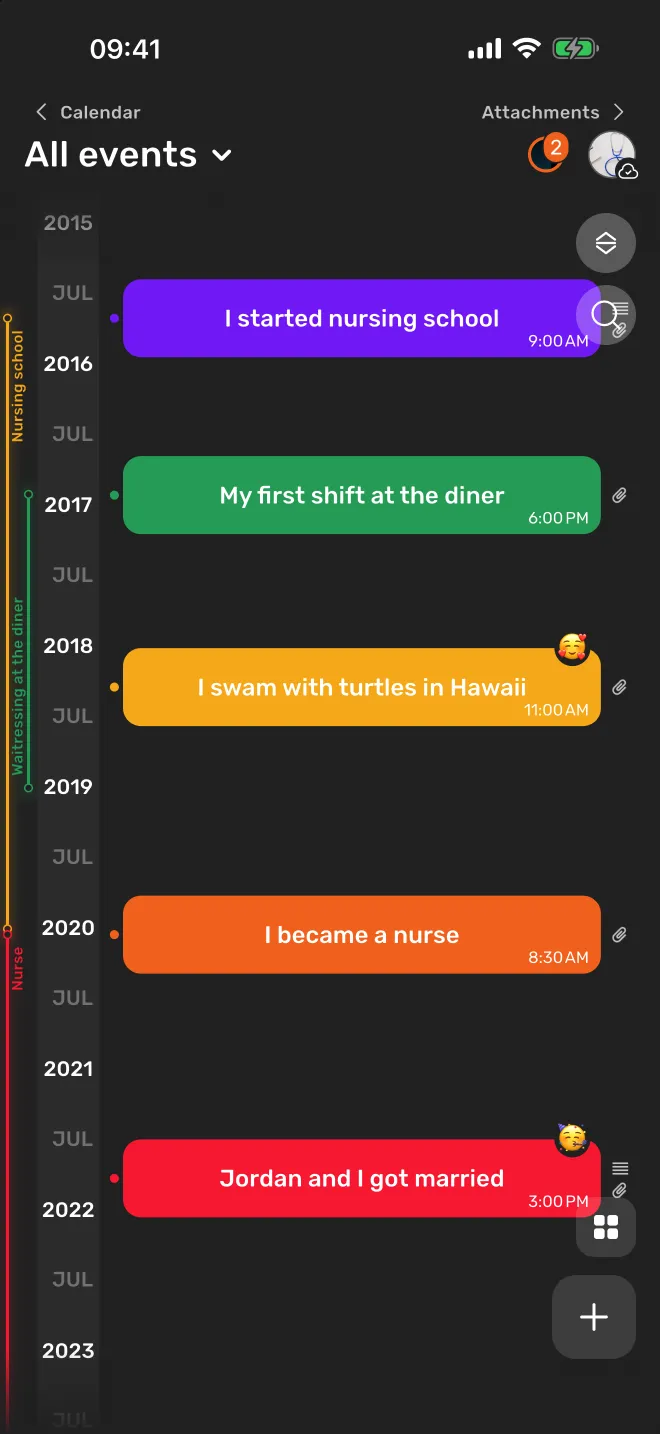
Intervals can overlap, just like real life: a job can run alongside a relationship and a move to a new city. One event can belong to several intervals at once.
How to create an interval
- Open Intervals. On a phone, tap the menu button above the + button on the main screen and choose Intervals. In the web app, choose Intervals in the side menu.
- Tap New interval.
- Name the chapter. Use the words you would use telling the story: “High school”, “First flat”, “Working at the diner”.
- Set the dates. Pick the start date, then the end date, or turn on Till now if the chapter continues.
- Pick a colour and tap Create. The interval appears on your timeline right away, already holding the events from those dates.
To change the name, the dates or the colour later, open the interval and tap the pencil. You can also delete an interval there; deleting it does not delete its events.
Not sure of an exact date? Pick your best guess and say so in the name, for example “Living in Berlin (dates approx.)”. You can correct it when you find a photo or a document.
Where you see your intervals
On the main timeline
Each interval is a coloured stripe beside your events, with its name written along it. As you scroll through the years you can see which chapter each memory belongs to. A chapter that is still going on ends in dashes at today.
On the Intervals page
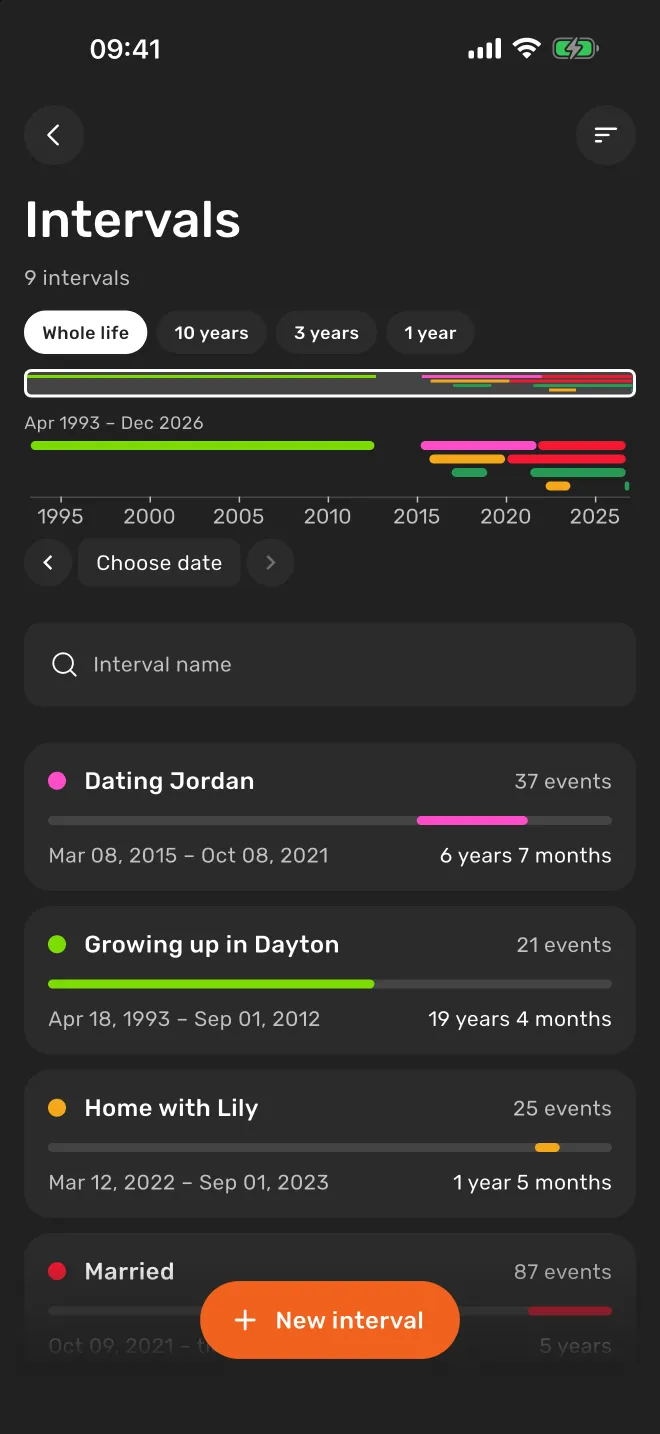
The Intervals page starts with a timeline of all your intervals. Switch between Whole life, 10 years, 3 years and 1 year, drag the frame on the mini-map to move through time, or choose a date to see which chapters were running on that day. Below is the list: each interval with its dates, how long it lasted and how many events it holds.
Inside an interval
Open an interval to see all the events within its dates, in one place. It is a quick way to reread a whole period, from the first day of a new job to the last.
On an event
An event shows the intervals it falls into, so when you open a memory you also see the chapter of your life around it.
Ideas for your first intervals
Start with two or three chapters you can date easily, then fill in the rest over time.
- School and studiesPrimary school, high school, university, a course that changed what you do.
- Places you livedYour childhood home, a first flat, the years in another city or country.
- WorkEach job, a career break, the time you ran your own project.
- RelationshipsDating someone, being married, living together.
- FamilyA pregnancy, a child’s first year, the years you cared for a parent.
- Seasons of lifeA gap year, a long trip, training for a marathon, a hard period you came through.
Intervals, tags and people: which to use
Lifely has three ways to organise events. They work together, and an event can use all three.
| What it is | How events get in | Example | |
|---|---|---|---|
| Interval | A span of time | Automatically, by date | University, 2014–2018 |
| Tag | A topic or label | You add it to an event | Travel, family, music |
| Person | Someone in your life | You add them to an event | Mum, Jordan, a best friend |
Use an interval when the question is “when?”: “what happened while I lived in Lisbon?”. Use a tag or a person when the question is “what?” or “who?”: “every trip I took”, “every memory with my sister”. Adding a person only organises your own entries; it does not share anything with them. See how tags work and how to add people.
Use intervals in the Lifely web app
Lifely also runs in your browser at app.lifely.page. Sign in with the same account as on your phone, and your intervals, events, tags and people are there. A big screen is handy for laying out many chapters at once: open Intervals in the side menu and look at your whole life on one line.
The mobile app is the main experience; some features differ on the web.
Frequently asked questions
Do I have to add events to an interval by hand?
No. An event belongs to an interval because of its date. Every event between the start and the end of the interval is in it, and if you change the dates, the list of events updates by itself.
Can intervals overlap?
Yes. Real life overlaps: you can study and work at the same time, or live in one city while dating someone. One event can be in several intervals, and the intervals timeline puts overlapping intervals in separate lanes.
What if the chapter has not ended yet?
Choose Till now instead of an end date. The interval then runs up to today and keeps growing until you set an end date.
Can I use intervals in the web app?
Yes. Open app.lifely.page in your browser and sign in with the same account you use on your phone. Intervals are in the side menu. Features can differ between platforms.
Are intervals free?
You can create a limited number of intervals for free. Lifely Premium removes the limit. The app shows the current limit and prices for your store.
How is an interval different from a tag?
An interval is a span of time: it collects events by their dates. A tag is a label you add to events yourself, whenever they happened, such as travel or family.
Mark your first chapter
Lifely is a personal life timeline and diary for iPhone, iPad, Android phones and tablets, Macs with Apple silicon and the web. Add a few memories, mark the chapters around them, and zoom from a single day to your whole life.


Free download with in-app purchases and ads. Some features require Premium. Your local store and the app show current availability and prices.
New to life timelines? Read how to make a personal life timeline, with a free printable template.